Patchcords in Fiber Optic Networks
Patchcords are used to cross-connect
installed cables and
connect communications equipment to the cable plant.
The choice of
patchcords is very important to the performance of the
network. Choose
patchcords with these criteria:
- Fiber
type must match the type of fiber in the cable
plant. For multimode cable, use only 50/125
patchcords with 50/125
fibers in cables and 62.5/125 patchcords with 62.5/125
fibers
in cables. Although there are several types of
each size fibers,
matching the fiber type exactly is generally not
required, e.g you can
use OM3 patchcords on OM2 or OM4 cable plants.
Singlemode fiber is
mostly the same, but some long distance fibers
have different mode
field diameters and should use patchcords with
matching fibers. Some
patchcords are made from special bend-insensitive
fibers.
Although there has been some controversy about the
compatibility of BI
fibers to normal fibers, manufacturers seemed to
have adapted their
designs to ensure compatibility.
- Choose
patchcords with proper cable
jacket color codes. This can help prevent
mismatching fibers, especially multimode
fibers.
- Choose
patchcords with the correct
matching connectors.
Choose connector types that match the connectors
on patch panels and
equipment. Since many cable plants use one type of
connector and the
equipment another, e.g. STs on a multimode
cable plant and LCs on the equipment, you may need
to stock hybrid
patch cables with different connectors on each end
to make the
connection. For singlemode networks, the
connectors must also have the
proper finished ferrule ends, either PC or ultra
PC polish for most
systems or angled PC (APC) connections for higher
speed systems or
those carrying AM video. Do not mix PC and APC
connectors as that may
damage them! The TIA 568
color code for connector bodies and/or boots is
Beige for multimode fiber except aqua for
laser-optimized fiber, Blue
for singlemode fiber, and Green for APC (angled
PC) connectors.
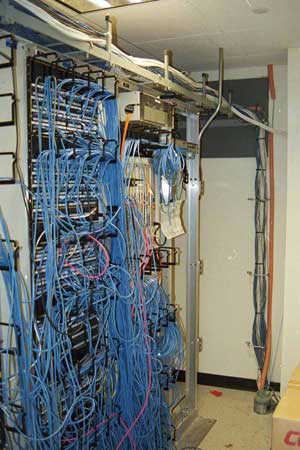
The performance of a fiber optic network
(and copper
networks too) can be undermined the performance of the
patchcords used
for interconnects and connecting communications
equipment. But it's
easy to take patchcords for granted. They are
inexpensive, often not
tested properly if at all, and sometimes treated
badly.
Most
users
buy patchcords in bulk and store them in boxes until
they are
needed, when they are unpackaged and plugged in. Some
users hang them
on the sides of the equipment racks. That's not how
they should be
handled.
When
it
comes to patchcords, there are three issues: quality,
cleanliness
and condition. You might assume that the patchcords
you buy are good
quality. They come in plastic bags usually with a
label that identifies
the fiber and connector type, length and test results.
We’ve seen cheap
imported patchcords with connectors with locking
mechanisms that would
not connect because they were improperly made and
connectors with
losses that tested at 1 dB although the label said 0.2
dB. Under closer
examination, the label appeared to be from a copy
machine not a
printer, so I doubt the cable was even tested. While
it's inconvenient
and expensive, testing every patchcord is highly
recommended per
the standard test, FOTP-171. If you do not test
them and have network problems, then look at them
first when troubleshooting the system.
Testing Patchcords
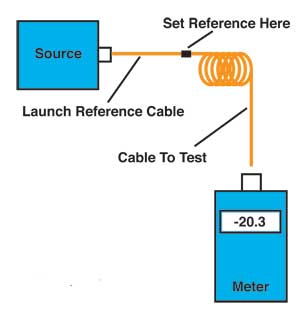
For
testing the loss of a
patchcord, you only need an 850 nm LED light source
for
multimode cable or 1310 laser for singlemode, a fiber
optic power meter
and some reference patchcords. Just remember that the
patchcords used
for references in testing must be good for tests to be
valid, so you
test them as you would other patchcords, just more
often.
Testing
patchcords
is similar to testing any fiber optic cable. Use one
reference patchcord to set a 0 dB reference. Connect a
patchcord to
test to the reference patchcord with a mating adapter.
Connect the
power meter to the other end of the patchcord and
measure the loss.
Since the length of the fiber is short, the loss
contribution of the
fiber is ignorable. And since one end of the cable is
attached to the
power meter, not another cable, you only measure the
loss of the one
connection between the reference cable and the cable
under test, so you
can test each connector individually.
To
complete
the testing of the patchcord, reverse the cable you
are
testing to check the connector on the other end.
Sometimes you will
find one bad connector and can replace it to make the
patchcord useful
again. But often the cost of replacing the connector
may be higher than
replacing the patchcord itself.
If
your
test equipment has different connectors than the
patchcords you
are testing, you will need hybrid reference cables
with connectors
compatible with the equipment on one end and the
patchcord connectors
on the other end. You will also need the correct
connector adapters for
your power meter.
Obviously,
all
reference cables used for testing must have high
quality connectors
to get reliable test results. Use this same method to
test your
reference cables against each other and discard any
with high losses,
usually those with losses over 0.5 dB.
Cleaning Patchcords
Cleanliness
is
an issue with brand new cables as well as used ones.
All connectors
should always have the polished ferrule covered by a
“dust cap” to
protect the end of the connector ferrule from damage
and dirt. However,
a user recently told me that after examining many
connectors with a
microscope, he understood why they were called dust
caps, they were all
full of dust. The dust cap should be used to protect
the connector
ferrule, but do not assume it keeps it clean. You must
clean connectors
before inserting them in mating adapters or active
devices to ensure
they are really clean. Here
are directions for cleaning.
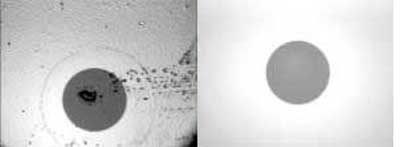
Cleaning Removes Dirt That Causes Loss
Those
cables
connecting equipment to the cable plant or hanging on
the sides
of racks are often mistreated, leaving kinks in the
cable or scratches
and scuffing on the connector ferrules. With the
reference cables used
for testing, the continual mating to other connectors,
even when
carefully cleaned before use, will cause scuffing that
increases loss
over time.
What this means is patchcords need continuous
inspection
and testing. It only takes a minute but can save you
lots of
troubleshooting time. Start
by checking the connector ferrules with a fiber
optic inspection microscope, preferably around
100 power, then test according to the procedure
above.
Handling Patchcords
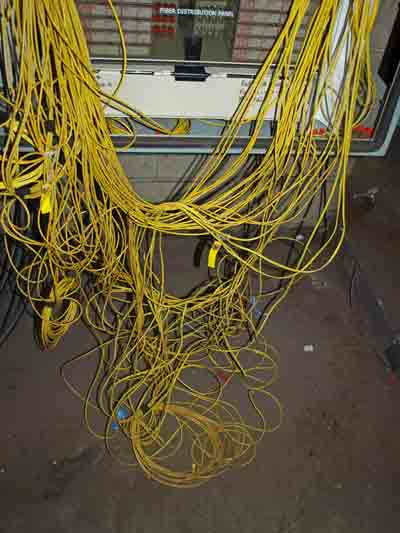
Patchcords are often subject to poor
treatment. They are
often hung off communications equipment or patch
panels stressing the
fiber at the back of the connector. When they are too
long, they are
bundled and hung in large piles on the side of
equipment racks. Kinking
is always a problem. Ideally, patchcords should be the
right length,
supported below the connection and carefully placed to
prevent stress.
Unfortunately, that is often not the case and network
performance may
suffer. Don't let your patchcords look like this:
|