Fiber Optics and Premises Cabling
Fiber Optic Architecture For Local Area Networks (LANs)
It’s fairly obvious that fiber optics is not copper wiring. The advantages of fiber include the capability of going longer distances at higher speeds, plus immunity to electromagnetic radiation. These advantages overcame fiber’s disadvantage in cost to make it the cabling of choice for telcom and CATV. While fiber is still primarily limited to LAN backbones in the premises cabling market, new methods and components are increasing its acceptance.
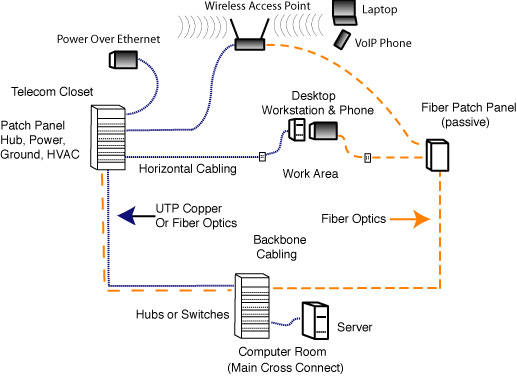
From the beginning, the EIA/TIA committees wrote the “568” standards around copper wiring. There was no logical reason to limit fiber to the architecture of UTP copper. While copper was technically limited to 100 meter links, fiber could go 2,000 meters or more at 100 Mb/s. But the architecture of 568 was written around copper, with a backbone cable to a telecom closet connecting the desktop over a horizontal cable of no more than 100 meters. As LAN speeds continued rising to gigabits/second, fiber became the media of choice for backbones, allowing easy upgrades and more flexibility in placing telecom rooms, as they became known, instead of "closets."
Several years ago, fiber’s capabilities were recognized in the TIA-568 standard with the addition of a centralized fiber architecture standard. The standard covered a network architecture that would place fiber hubs in the computer room and run backbone fiber to the telecom room, then through passive interconnects to the desktop. By allowing a direct to the desktop connection, there was no need for electronics in the telecom room. This meant that a data ground, conditioned, uninterruptable power, and air conditioning were also not needed, greatly reducing the cost to the end user and making fiber cost effective compared to copper.
The copper people learned a lesson from fiber and created zone cabling. Zone cabling adds an additional consolidation point near desktops. Rather than the usual run of up to 90 meters of permanently-installed horizontal cabling using a single cable for every desktop, zone cabling uses a backbone cable from the telecom closet to the consolidation point, then short individual cables to the desktop.
Zone cabling creates a “mini telecom closet” near the user. It’s a terrific solution for modular furniture designs that include pathways for cables. When the offices move, the furniture can be unplugged and moved but the wiring from the telecom closet to the consolidation point remains for future use. The modular furniture can be moved to another point where it again connects to a local consolidation point.
Another useful gadget is the MUTOA or "multi-user telecom outlet assembly." It is a patch panel or box with up to 12 connections that can be installed near a number of users who make their connections to that instead of a wall outlet. With proper design, it can not only simplify installation, but it can make MACs (moves, adds and changes) much easier.
There can be a big advantage in installation, where only one cable is pulled to an area, then shorter cables are used to connect to the desktop. This works for fiber optics and multi-pair telephone cabling, but may not be possible for all copper data cabling. For example, one can buy 25 pair Cat 5E cable, but not Cat 6, so if the user decides to install Cat 6, the cable runs to the zone box must be individual Cat 6 cables.
Fiber optics and zone cabling work well together. Using multifiber cables, a single cable can connect multiple desktops to a backbone cable with minimal bulk and weight, often a big problem in offices with many desktop connections. Overhead cable trays can become filled with many Cat 5E or Cat 6 cables, but one small, lightweight fiber cable can connect dozens or even hundreds of desktops.
Zone cabling works well with prefabricated fiber optic cable systems also. Cables can be factory terminated and the connectors enclosed in a protective boot for pulling. After the cable is pulled and secured, the boot is removed and connected to the zone box or MUTOA, and the cable is ready for use.
These prefabricated cable assemblies offer several advantages. They are faster to install and have no yield problems on the connectors since every one is factory made and tested. The total installed cost of the components is often less than field termination, but the price to the customer is the same, so they can be more profitable for the contractor. As a downside, they do require more care in installation to prevent damage to the connectors.
End users choose zone cabling for fiber to the desk applications because it reduces cable clutter and saves them money. It is not hard to design such a network if you know the basic layout and choose cabling hardware early in the process. Cable installation is easy since fewer cables are required but may require additional terminations at the zone boxes or MUTOAs. Like all installations, careful planning will yield an easier, neater installation.
Is Wireless Replacing Cable To The Desktop?
For many LAN applications, it appears that the choice of copper vs. fiber to the desktop may be neither. While these two have been trading claims over cost, technology and power, WiFi wireless networks have been developed to provide high quality connections at speeds that are more than adequate for most users and security issues have been addressed.
The move to wireless connectivity has happened because most corporate users now prefer tablets or laptops with built-in WiFi to desktop computers for mobility. Many people also own portable mobile devices like smart phones, iPhones and Blackberries with wireless access that are becoming almost as powerful as a laptop.
Within the enterprise LAN, the backbone is primarily fiber, with new installations mostly using OM3/OM4 laser-optimized 50/125 variety capable of being upgraded from today’s 1 to 10 gigabits per second to 40 or even 100 in the future. The remaining desktop computer users will still get Cat 5e or Cat 6 to the desktop since it’s cheaper.
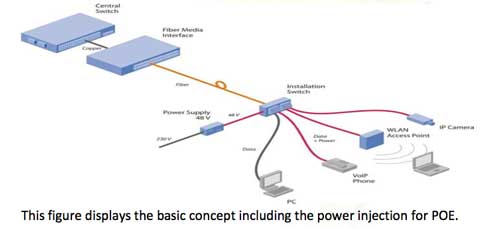
Two other options are FTTO, using singlemode fiber to connect to a small, usually 2 or 4 port Gigabit Ethernet switch in the office where devices (including wireless access points) may plug in with a simple Cat 5e patchcord and passive optical LANs (POLs) using fiber to the home (FTTH) passive optical network (PON) components to implement a secure LAN within the premises or campus.
Here is a diagram for FTTO:
This is a POL where the ONT is the desktop connection:
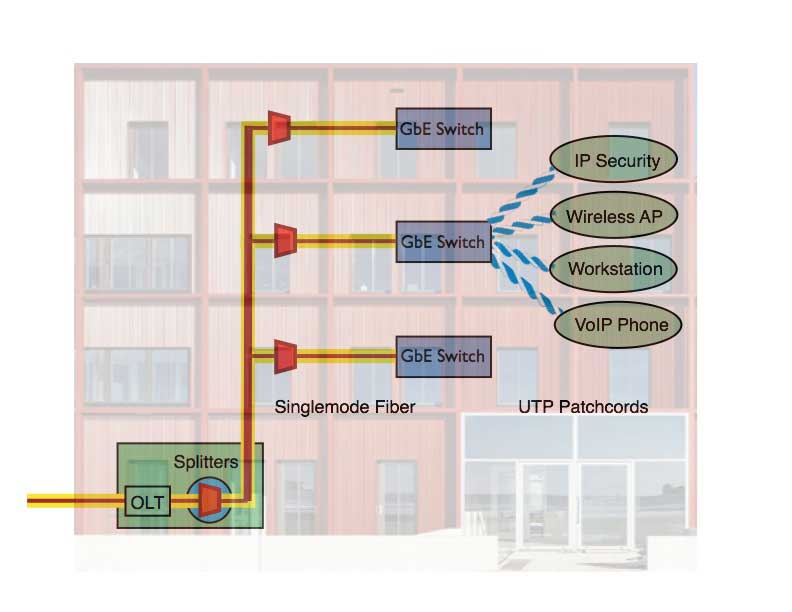
Both these solutions appear to be less expensive than traditional structured cabling. Here is more information.
The new generation of higher bandwidth wireless requires more access points which have traditionally been connected over copper, and recently have been powered over the same copper cables also. But there seems to be some question about whether adequate power for these new wireless access points can be carried over the same copper cables that must provide Gigabit Ethernet connectivity. Fiber may prove to be a better choice here too.
Data Centers
Data centers are comprised of many computers acting as servers, pulling data from storage disks and sending it to routers for transmission over the Internet. Because of the massive amounts of data served, data center links use the highest speeds available, currently 1 gigabit or 10G Ethernet or Fibre Channel at 1, 2, 4, 8 or 10 Gb/s.
At 1 Gb/s the choice for connections are fiber or UTP copper, with copper probably being more popular. As data centers migrate to links with speeds above 1 Gb/s, UTP cabling must be upgraded to Cat 6A (augmented Cat 6) which is expensive, much larger than Cat 5e or Cat 6, and requires transceivers that consume 4-8 times as much power as fiber transceivers, a big problem in data centers where power consumption - and the heat generated - cause problems. Other choices are coax copper for short links or fiber for any length of link. Most data centers use those two choices, with the fiber being high bandwidth laser-optimized 50/125 OM3 fiber.
More on Data Centers.
The FOA Reference Guide on Premises Cabling.
|