Installing
UTP Cabling
UTP
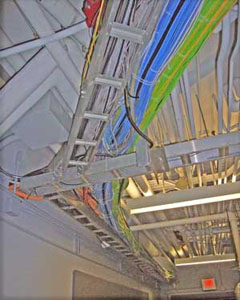
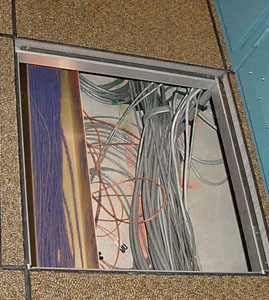
Cabling can be installed in many ways, under floors or above
ceilings in cable trays, inside conduit, in J-hooks attached
to walls or roof supports, inside walls, even inside special
cable trays in modular furniture. Installations need to be
tailored to the property being cabled, the equipment being
connected and local building codes, making generalizations
about installations difficult. For all installations, however,
certain cautions apply.
-
- Mistakes
in
installation of UTP cable can be detrimental to cabling
performance and very difficult to detect. A mistake that
could keep the entire system from working might not show
up at all until the system is completely installed and
turned on.
- Proper
installation
depends on proper design. The facility in which cabling is
being installed should be designed according to industry
standards which include all the pathways and spaces in
which cabing and equipment will be installed. Even where
the cables are routed in the building is important. Cables
should be kept dry and in moderate temperatures. Above the
ceiling in some buildings in hot climates can get very
hot, causing UTP cable to have higher attenuation so it
will not support full standard link distances.
- Supports
for
the cables should be wide enough to support the cables
without distortion, spaced closs enough so the weight of
cable supported (copper cable bundles are heavy!) and have
no sharp edges to cut or kink the cables.
-
- The
performance of the cabling network is also heavily
dependent on the installation. The components used in
structured cabling installation have been carefully
designed and exhaustively tested to meet or exceed the
requirements of EIA/TIA 568 for performance at 100-250
MHz. If the cable is not properly installed, performance
will be degraded.
-
- Just
like
we keep reminding about maintaining the pair twists right
down to the terminations, there are other things you must
realize to maintain the performance of Cat 5e/6/6a UTP
cable! First of all, pulling tension must be less than 25
pounds. That's not very much tension! Pulling at higher
tension can stretch the cable and affect the twists in the
pairs, and it's those twists that make the cable perform
well at high frequencies.
- Puling
cable
in conduit is especially critical as you must deal with
friction in the conduit and pulling around bends.
Installing breakout boxes for intermediate pulls is often
necessary and one may need to use pulling lubricants in
the conduit. (Just be sure to use an appropriate lubricant
to prevent long term degradation of the cable.) Likewise,
kinking the cable by letting it get twisted or pulled
around sharp corners can cause permanent damage. Damaged
cable will probably not pass crosstalk tests.
Patch
panels can have massive number of cables, so managing these
cables can be quite a task in itself. It is important to keep
all cables neatly bundled and labeled so they can be moved
when necessary. However, it is also important to maintain the
integrity of the cables, preventing kinking or bending in too
small a radius which may adversely affect frequency
performance.
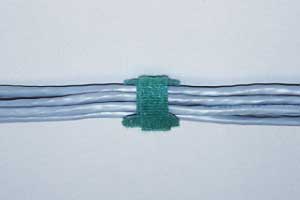
One should also avoid bundling the cables too tightly.
Crushing the cables can affect the performance, since it can
affect the twist and pair alignment in the cable which affects
high frequency performance. If one uses regular plastic cable
ties, they should be tightened only finger tight and cut off -
do not use cable tie guns which may tighten tight enough to
damage the cables. Preferably use "hook and loop" cable ties
(shown above) which have an added advantage that they can
easily be opened to add or remove cables.
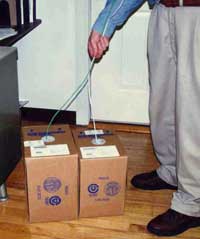
- Most
cable boxes are designed to allow easy pulling directly
from the box. Gather up several boxes and pull a bunch of
cables at once. Tape them together and attach a pullstring
or just feed them along by hand.
-
- You
can
pull from the telecom closet or to the closet, whichever
is more convenient in the install you are doing. You can
also pull to consolidation points then out to individual
outlets or vice versa, instead of pulling the bundle of
cables all the way. Riser installations are more easily
done by dropping cables down rather than pulling up. Riser
installations need to be secured at regular intervals to
prevent the weight of the cables suspended from causing
long term problems.
-
- One
item to remember is there is usually 1,000 feet (about 300
meters) of cable in each box. Each cable is also marked
with a distance every few feet so you can keep track of
length by reading the distance off the cable. Before you
pull any cable from the box, find the distance marked on
the cable and write it down on top of the box! That way,
you can calculate the length of each cable you pull and
more importantly, the amount remaining in the box! It's
not good to start pulling a cable and find out it's not
long enough!
-
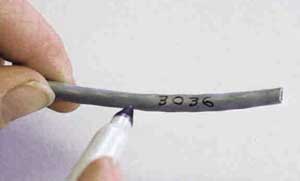
- Likewise,
mark every cable with a location it's going to. Mark it on
both ends! You will save lots of time making the correct
connections, recording test data and keeping records for
moves and changes. A fine tip permanent marker will mark
the cable neatly.
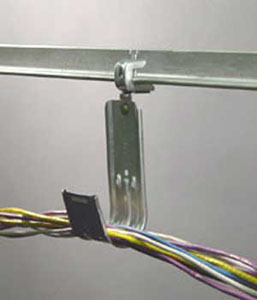
- UTP
cable should be installed on special hooks, bridle rings
or cable trays that limit its bend radius and stress to
preserve the performance. You cannot lay the cable on top
of ceilings or hang from the drop ceiling hangers - in
most places it's against code! Penetrations of firewalls
always require firestopping to restore fire retardancy.
You also have to keep the wire away from sources of
electrical interference, like fluorescent lights and power
cables.
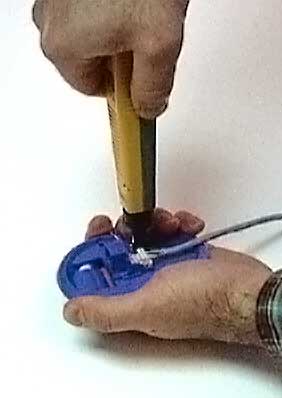
And, of course, we'll remind you again that twists on the
pairs must be kept within 1/2 inch (13mm) to maintain the
crosstalk performance of the cable through the terminations.
-
-
- Safety
-
- Power
cables are also a safety hazard. Although this cable is
called "low voltage," it runs in areas full of power
cables that can be a shock hazard. If you are not familiar
with electrical safety, fire safety and inspections, I
strongly suggest taking a course on the NEC (National
Electric Code in the US, CEC in Canada and similar codes
in other countries) to learn about these important topics.
It could save your life!
- And
when premises cabling systems are installed, they may be
inspected by local building or electrical inspectors for
proper installation according to the NEC.
-
Here is a summary of NEC references to VDV Cabling:
| Chapter |
Article |
Topic |
| 6 |
640 |
Sound
Systems |
| 7 |
725 |
Remote-Control,
Signaling and Power-Limited Circuits |
| 7 |
760 |
Fire
Alarm Signaling Systems |
| 7 |
770 |
Optical
Fiber Cables and Raceways |
| 7 |
780 |
"Smart
House" Wiring |
| 8 |
800 |
Telecommunications
Circuits (Telephone and LAN) |
| 8 |
810 |
Radio
and TV Equipment |
| 8 |
820 |
CATV
Systems |
| 8 |
830 |
Network-Powered
Broadband Systems |
- Other
safety considerations:
- -Hard
hat, safety glasses, appropriate gloves and steel toe
shoes are recommended.
- -Observe
ladder safety rules - many installations require work
above ceilings.
-
-
- Inspection
-
- Electrical
inspectors do not always inspect communications wiring.
Nonetheless, take a moment to check with local electrical
inspectors before you do any work in their jurisdictions.
In most cases, the inspector of your installation will be
the same person who signs you contract, although in some
cases, the inspector will be a third party. Make sure you
know who will inspect your work before you give your
customer a final price. You must know what the inspector
will expect of you and what he or she will be looking for.
-
-
- Installation
Tips:
-
- All
components must be equally rated at the highest level
expected from the installation, e.g. all Cat5e rated for
Cat 5e performance
- Cable
must be pulled from the reel or box without kinking
- Cable
must be pulled with less than 25 pounds of tension
- Use
cable lubricant in conduit if necessary
- Cable
must not be pulled around sharp corners or kinked
- Inspect
the cable routes for surfaces that may abrade the cable
- On
riser installations (overhead installation), try to lower
the cable down, not pull up and secure carefully at
recommended intervals.
- Cables
must be supported to prevent stress. Cable supports should
not have sharp edges that may distort the cable
- Cable
ties must not be so tight as to distort the jacket of the
cable. They are only used to prevent unnecessary movement
of the cable, so snug is tight enough.
- Carefully
follow all codes and firestop all penetrations.
Test your
comprehension with the section quiz.
Premises
Cabling Website Contents
Each page will open in a new window.
Overview
of Premises Cabling and Standards
Jargon
Networks
UTP
Cables, Power Over
Ethernet.
UTP
Terminations, (Tutorial).
UTP
Termination.
UTP
Installation VHO 66
Block, 110
Block, Jacks,
Plugs
UTP
Testing, UTP
Wiremapping
Coax
Cable VHO Coax
Termination
Fiber
Optics in Premises Cabling
Wireless
Design,
New T-568-C
Nomenclature
Premises
Cabling Installation
Glossary
See
the "Fiber Optic
Technology and Standards" Section below for
information on networks, etc.
FOA
Lectures on Premises Cabling and videos about cable
preparation, termination, splicing and testing on 
|